Ursa Books

Free UK bookkeeping software

Ursa Books

Free professional bookkeeping and accounts software for your business. Manage your books from one simple page.

Coming soon
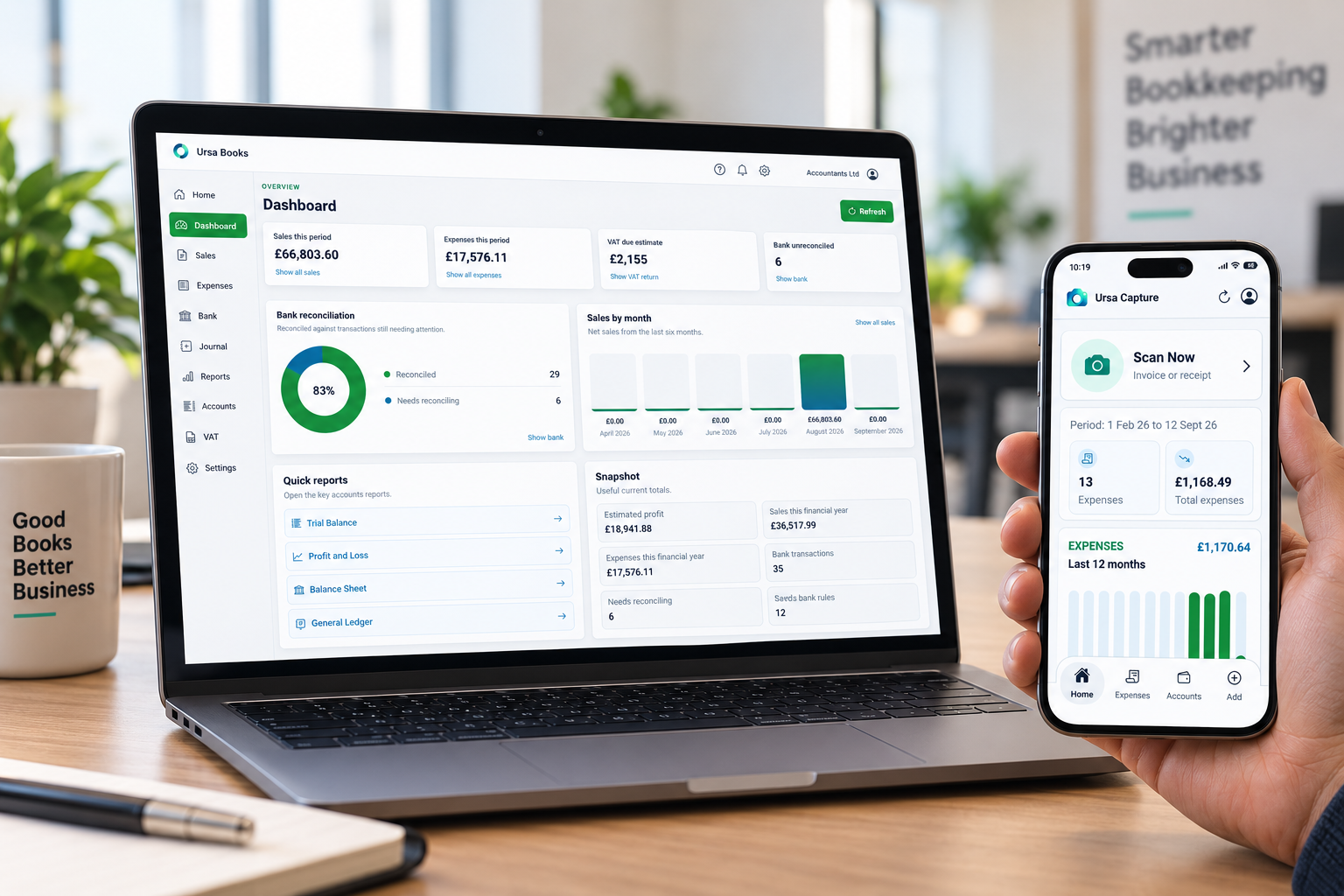
Ursa Books dashboard

What it does

Simple bookkeeping. Powerful tools when you need them

Manage your everyday bookkeeping from one simple page. Record transactions, upload bank statements and keep your accounts organised.

Need to go deeper? Ursa Books has the tools to handle more detailed accounting tasks too.

AI Accounting — Less admin. More answers.

Ask questions about your books in plain English, from profit margins to sales trends. Get clear insights and let AI extract supplier invoice details straight into Ursa Books.

Sales — Invoice in minutes. Keep business moving.

Create, send and share professional invoices with ease, or import sales in bulk from CSV. Spend less time on paperwork and more time growing your business.

Expenses — Capture expenses. Skip the typing.

Turn supplier invoices into recorded expenses with automatic detail extraction. Add invoices in minutes or import expenses in bulk from CSV to keep your books up to date.

Banks — Connected banking. Simpler bookkeeping.

Connect your bank or upload statements and make light work of reconciliation. Smart account suggestions and saved bank rules help you match transactions faster and keep your records organised.

Reports — Know your numbers. Make confident decisions.

See how your business is performing with up-to-date financial reports. Track cash flow, check your profit and see who owes what, with Profit and Loss, Balance Sheet, aged debtor and creditor reports, and more.

VAT Returns — Less paperwork. More clarity.

Prepare your VAT returns and review VAT on sales and purchases in one place. With support for both cash and standard VAT accounting, stay organised and ready to file.

“Simple bookkeeping. Clear answers. Everything your business needs in one place.”
Ursa Books

A Bookkeeping solution for every business.

Sole Traders

Keep your income, expenses and tax records organised in one simple place. Easy bookkeeping that lets you focus on doing what you do best.

Partnerships

Stay on top of your partnership’s sales, expenses and cash flow. Keep your books organised and give your accountant the records they need.

Property

Track rental income and property expenses with ease. Get a clear view of what’s coming in and going out, so you can manage your property business with confidence.

Limited Companies

Manage invoices, expenses, banking and VAT in one place. Keep your company’s books up to date, with clear financial reports for you and your accountant.

FAQs

Questions about Ursa Books

What is Ursa Books?
Ursa Books is bookkeeping and accounts software designed to help UK businesses record transactions, organise bank activity, manage VAT and review financial reports from one place.
Is Ursa Books free to use?
Yes. The core Ursa Books web app is free to use. Optional paid add-on tools are available separately for businesses that want features such as mobile invoice capture, automated bank feeds or additional AI assistance.
Who is Ursa Books suitable for?
Ursa Books is designed for sole traders, partnerships, property businesses and limited companies. Its simple Home view supports everyday business users, while Accounts mode provides detailed tools for bookkeepers and accounting professionals.
Can I import existing sales, expenses and bank transactions?
Yes. Sales and expenses can be imported in bulk from CSV files, and bank statements can also be uploaded for review and reconciliation. Imported rows can be checked and corrected before they are submitted.
Does Ursa Books support VAT returns?
Yes. You can prepare VAT returns for a selected period, review the related Output VAT and Input VAT transactions, export the return to a spreadsheet and mark completed returns as filed.
Which VAT accounting schemes are supported?
Ursa Books supports both UK Cash Accounting and Standard VAT Accounting. Your chosen scheme can be set in Settings and determines when eligible sales and purchase transactions appear on a VAT return.
How does bank reconciliation work?
Upload a bank statement, select the relevant bank account and review suggested matches. Transactions can be matched to existing sales or expenses, used to create a new transaction, or processed with saved bank rules for similar future activity.
What reports are available?
Reports include Profit and Loss, Balance Sheet, Trial Balance, General Ledger, aged debtors, aged creditors and transaction reports. Date filters make it easier to review a specific month, quarter or financial year.
What is Ursa Capture?
Ursa Capture is an optional mobile add-on powered by AI. It lets subscribed users photograph or upload supplier invoices and receipts, review the extracted details and post approved expenses directly into Ursa Books.
How is my bookkeeping data protected?
Ursa Books uses Supabase for authentication and database services. Row Level Security policies restrict users to their own business records. You should still protect your password, review imported information and check reports before relying on them for filing or business decisions.